In this guide you will build a smart cart — a personalized weekly product bundle that adapts to a user’s health data. The flow looks like this:
A user in recovery mode gets anti-inflammatory foods, collagen, and bone broth. Someone in high-training mode gets energy bars, electrolytes, and high-calorie meal kits. A user flagged for sleep-support gets chamomile tea, melatonin, and calming dinners. The cart builds itself from health data — no manual curation needed.
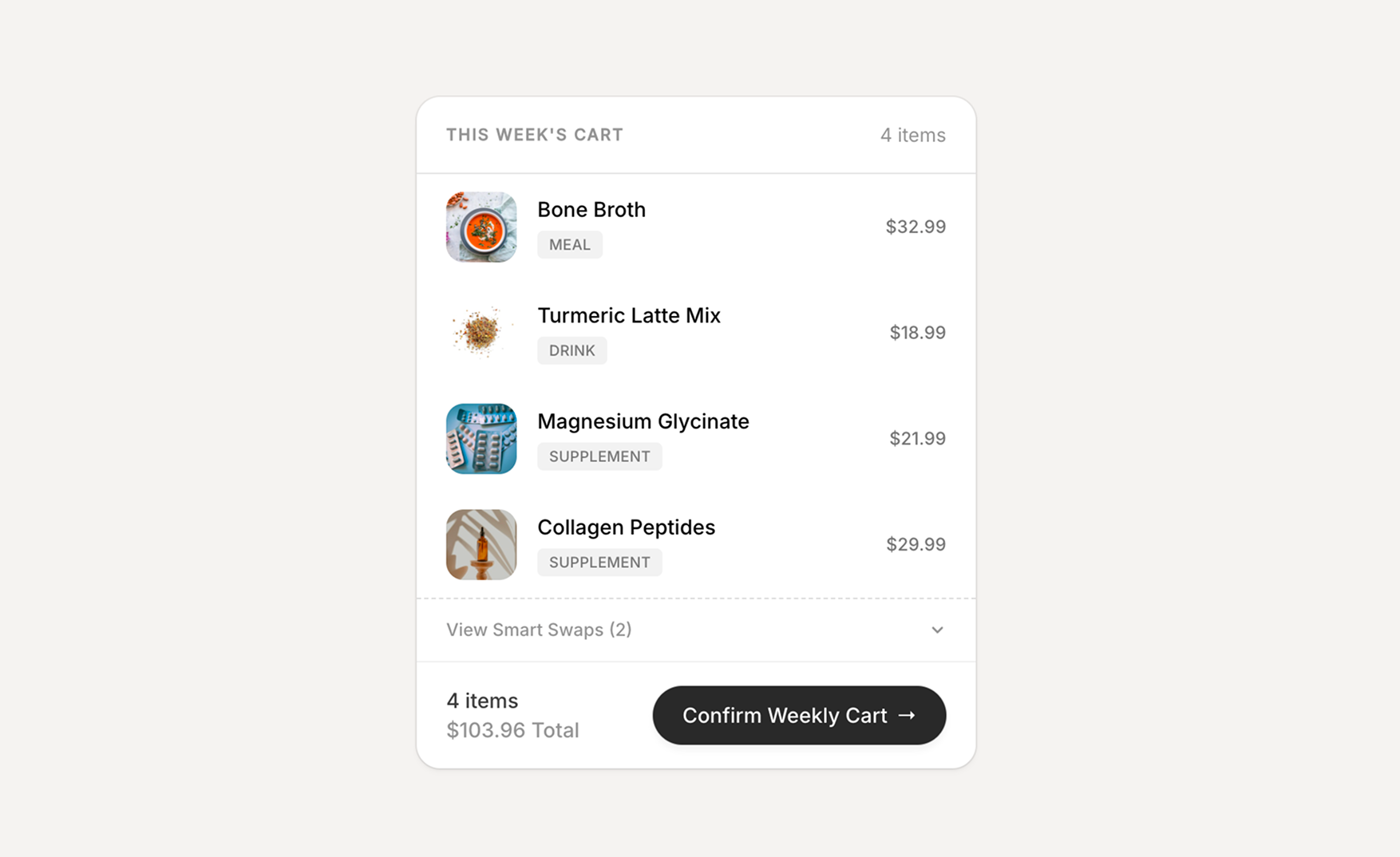
By the end you will have an API endpoint that accepts a Sahha profile ID and returns a categorized health state, plus a product catalog structure that maps states to curated bundles. The starter project download includes a complete React frontend with the cart UI.
Prerequisites
Before you begin, make sure you have Sahha webhook data streaming into your database — follow the guide for your platform:
Stream health events to Supabase with Edge Functions
Stream health events to Convex with HTTP Actions
Stream health events to Firebase with Cloud Functions
Configure Sahha webhooks and event capture
You will also need:
- Node.js 18+ and a package manager (npm, pnpm, or yarn)
- A Sahha account with at least one profile generating health data — sahha.ai
How health state categorization works
The core idea behind the smart cart is mapping raw health metrics to a high-level health state that drives product selection. There are two data sources:
-
Scores — Sahha generates numeric scores on a 0–1 scale for dimensions like
activity,readiness,sleep,wellbeing, andmental_wellbeing. Each score includes factor breakdowns with names, values, and states (e.g.low,medium,high). -
Archetypes — Weekly behavioral patterns that Sahha computes from sustained behavior over time. For example,
activity_level: moderately_activetells you this person consistently exercises, even if today’s score dipped because they rested.
The categorization strategy prioritizes archetypes over raw scores. An established active lifestyle should not shift someone into recovery mode just because they had one low-readiness day. The decision tree:
archetype = activity_level
activity  = avg score for "activity"
readiness = avg score for "readiness"
sleep     = any factor with name containing "sleep" or "circadian"

├─ archetype in (moderately_active, highly_active)
│  AND activity ≥ 0.7
│  → high-training
│
├─ any sleep factor has state "low" / "minimal"
│  OR sleep factor score < 0.4
│  → sleep-support
│
├─ readiness < 0.78
│  → recovery
│
├─ readiness ≥ 0.78 AND activity ≥ 0.78
│  → high-training
│
└─ default
   → recovery
This gives you three health states — recovery, high-training, and sleep-support — each of which maps to a different product selection.
Query health data
Fetch the latest scores and archetypes for a given user. There are two important things to know:
- Scores include a type (e.g.
activity,sleep,readiness), a numeric value, and factor breakdowns — extract these fields rather than passing raw JSON to the categorization logic - Archetypes need a separate, dedicated query because they are less frequent than score events and get buried in a generic time-ordered query. Deduplicate by name so you only keep the latest value per archetype
import { createClient } from "@supabase/supabase-js";

const supabase = createClient(
  Deno.env.get("SUPABASE_URL")!,
  Deno.env.get("SUPABASE_SERVICE_ROLE_KEY")!
);

// Fetch recent score events
async function getRecentScores(externalId: string) {
  const yesterday = new Date(
    Date.now() - 24 * 60 * 60 * 1000
  ).toISOString();

  const { data: events, error } = await supabase
    .from("sahha_events")
    .select("*")
    .eq("external_id", externalId)
    .eq("event_type", "ScoreCreatedIntegrationEvent")
    .gte("created_at", yesterday)
    .order("created_at", { ascending: false })
    .limit(50);

  if (error) throw error;
  return events;
}

// Fetch archetypes — deduplicated by name
async function getRecentArchetypes(externalId: string) {
  const { data: events, error } = await supabase
    .from("sahha_events")
    .select("*")
    .eq("external_id", externalId)
    .eq("event_type", "ArchetypeCreatedIntegrationEvent")
    .order("created_at", { ascending: false })
    .limit(30);

  if (error) throw error;

  // Keep only the latest event per archetype name
  const seen = new Set<string>();
  return events.filter((e) => {
    const name = e.payload?.name;
    if (name && !seen.has(name)) {
      seen.add(name);
      return true;
    }
    return false;
  });
}
// ─── convex/queries.ts ──────────────────────────────────
import { internalQuery } from "./_generated/server";
import { v } from "convex/values";
// Fetch recent events for a user (scores, biomarkers, etc.)
export const getByExternalId = internalQuery({
args: {
externalId: v.string(),
limit: v.optional(v.number()),
},
handler: async (ctx, args) => {
const limit = args.limit ?? 50;
const events = await ctx.db
.query("healthEvents")
.withIndex("by_user_type", (q) =>
q.eq("externalId", args.externalId)
)
.order("desc")
.take(limit);
return events.map((e) => ({
eventType: e.eventType,
payload: e.payload,
receivedAt: e.receivedAt,
}));
},
});
// Fetch archetypes — deduplicated by name
export const getArchetypesByExternalId = internalQuery({
args: { externalId: v.string() },
handler: async (ctx, args) => {
const events = await ctx.db
.query("healthEvents")
.withIndex("by_user_type", (q) =>
q
.eq("externalId", args.externalId)
.eq("eventType", "ArchetypeCreatedIntegrationEvent")
)
.order("desc")
.take(30);
// Keep only the latest per archetype name
const seen = new Set<string>();
const unique = [];
for (const e of events) {
const name = (e.payload as Record<string, unknown>)
?.name as string;
if (name && !seen.has(name)) {
seen.add(name);
unique.push({
eventType: e.eventType,
payload: e.payload,
});
}
}
return unique;
},
});
// Note: Both queries use internalQuery — they can only be called
// from other Convex server-side functions (like the HTTP action
// in the next step), not from the client.import { getFirestore } from "firebase-admin/firestore";
const db = getFirestore();
// Fetch recent score events
async function getRecentScores(externalId: string) {
const yesterday = new Date(
Date.now() - 24 * 60 * 60 * 1000
).toISOString();
const snapshot = await db
.collection("sahha_events")
.doc(externalId)
.collection("ScoreCreatedIntegrationEvent")
.where("createdAtUtc", ">=", yesterday)
.orderBy("createdAtUtc", "desc")
.limit(50)
.get();
return snapshot.docs.map((doc) => doc.data());
}
// Fetch archetypes — deduplicated by name
async function getRecentArchetypes(externalId: string) {
const snapshot = await db
.collection("sahha_events")
.doc(externalId)
.collection("ArchetypeCreatedIntegrationEvent")
.orderBy("createdAtUtc", "desc")
.limit(30)
.get();
const events = snapshot.docs.map((doc) => doc.data());
// Keep only the latest event per archetype name
const seen = new Set<string>();
return events.filter((e) => {
const name = e.payload?.name;
if (name && !seen.has(name)) {
seen.add(name);
return true;
}
return false;
});
}Categorize health state
The categorization logic is the same regardless of which database you use. Add these types and helper functions to your endpoint file:
// ─── Types ───────────────────────────────────────────────────────

interface ScoreData {
  type: string;
  score: number;
  state: string;
  factors: Array<{ name: string; score: number; state: string }>;
}

interface ArchetypeData {
  name: string;
  value: string;
  periodicity: string;
}

type HealthStateId = "recovery" | "high-training" | "sleep-support";

// ─── Score Helpers ───────────────────────────────────────────────

/** Average score for a given type across all events */
function avgScoreByType(
  scores: ScoreData[],
  type: string
): number | null {
  const matches = scores.filter((s) => s.type === type);
  if (matches.length === 0) return null;
  return matches.reduce((sum, s) => sum + s.score, 0) / matches.length;
}

/** Latest score per type (deduped, most recent first) */
function getLatestScores(scores: ScoreData[]) {
  const seen = new Set<string>();
  const latest: ScoreData[] = [];
  for (const s of scores) {
    if (!seen.has(s.type)) {
      seen.add(s.type);
      latest.push(s);
    }
  }
  return latest;
}

/**
 * Categorize health state from scores + archetypes.
 *
 * Archetypes (weekly behavioral patterns) override raw score dips
 * when they indicate an established lifestyle.
 */
function categorizeHealthState(
  scores: ScoreData[],
  archetypes: ArchetypeData[] = []
): HealthStateId {
  const avgReadiness = avgScoreByType(scores, "readiness");
  const avgActivity = avgScoreByType(scores, "activity");

  // Check for active archetype
  const activityArchetype = archetypes.find(
    (a) => a.name === "activity_level"
  );
  const isActiveArchetype =
    activityArchetype != null &&
    (activityArchetype.value === "moderately_active" ||
      activityArchetype.value === "highly_active");

  // Active lifestyle + good activity → high-training
  if (isActiveArchetype && avgActivity !== null && avgActivity >= 0.7) {
    return "high-training";
  }

  // Low sleep factors → sleep-support
  const hasLowSleepFactors = scores.some((s) =>
    s.factors.some(
      (f) =>
        (f.name.includes("sleep") || f.name.includes("circadian")) &&
        (f.state === "low" || f.state === "minimal" || f.score < 0.4)
    )
  );

  if (hasLowSleepFactors) {
    return "sleep-support";
  }

  // Low readiness → recovery
  if (avgReadiness !== null && avgReadiness < 0.78) {
    return "recovery";
  }

  // High readiness + high activity → high-training
  if (
    avgReadiness !== null &&
    avgActivity !== null &&
    avgReadiness >= 0.78 &&
    avgActivity >= 0.78
  ) {
    return "high-training";
  }

  return "recovery";
}sleep-support state, but Sahha’s archetypes distinguish why someone sleeps poorly. An irregular sleeper (sleep_regularity) needs different products than someone with poor sleep quality (sleep_quality) or short duration (sleep_duration). Use the same categorization pattern with more branches to target products at the cause, not just the symptom. See the full list of available signals in the Data Dictionary. This week's cart is designed for recovery. Your readiness score is low and activity has dropped — we've selected anti-inflammatory foods, collagen, and gentle nutrition to support your body's repair cycle.


This week's cart is designed for high-training performance. Your activity archetype is moderately active and your activity score is high — we've loaded energy-dense foods, electrolytes, and performance supplements.




This week's cart is designed for sleep support. Your sleep score is low with poor circadian alignment — we've picked calming teas, melatonin, and light evening meals to help restore your rhythm.


Build the smart cart endpoint
Combine the queries and categorization logic into a single POST /smart-cart endpoint that accepts an externalId and returns the categorized health state with scores and archetypes.
// ─── supabase/functions/smart-cart/index.ts ─────────────
import { createClient } from "@supabase/supabase-js";

const supabase = createClient(
  Deno.env.get("SUPABASE_URL")!,
  Deno.env.get("SUPABASE_SERVICE_ROLE_KEY")!
);

Deno.serve(async (req) => {
  // CORS preflight
  if (req.method === "OPTIONS") {
    return new Response(null, {
      status: 204,
      headers: {
        "Access-Control-Allow-Origin": "*",
        "Access-Control-Allow-Methods": "POST, OPTIONS",
        "Access-Control-Allow-Headers": "Content-Type",
      },
    });
  }

  if (req.method !== "POST") {
    return new Response("Method not allowed", { status: 405 });
  }

  const corsHeaders = {
    "Access-Control-Allow-Origin": "*",
    "Access-Control-Allow-Methods": "POST, OPTIONS",
    "Access-Control-Allow-Headers": "Content-Type",
  };

  try {
    const { externalId } = await req.json();
    if (!externalId) {
      return new Response(
        JSON.stringify({ error: "externalId is required" }),
        {
          status: 400,
          headers: { "Content-Type": "application/json", ...corsHeaders },
        }
      );
    }

    // 1. Query scores
    const yesterday = new Date(
      Date.now() - 24 * 60 * 60 * 1000
    ).toISOString();

    const { data: scoreEvents } = await supabase
      .from("sahha_events")
      .select("*")
      .eq("external_id", externalId)
      .eq("event_type", "ScoreCreatedIntegrationEvent")
      .gte("created_at", yesterday)
      .order("created_at", { ascending: false })
      .limit(50);

    // 2. Query archetypes (deduplicated)
    const { data: allArchetypes } = await supabase
      .from("sahha_events")
      .select("*")
      .eq("external_id", externalId)
      .eq("event_type", "ArchetypeCreatedIntegrationEvent")
      .order("created_at", { ascending: false })
      .limit(30);

    const seen = new Set<string>();
    const archetypeEvents = (allArchetypes ?? []).filter((e: any) => {
      const name = e.payload?.name;
      if (name && !seen.has(name)) {
        seen.add(name);
        return true;
      }
      return false;
    });

    // 3. Extract scores
    const scores = (scoreEvents ?? [])
      .map((e: any) => {
        const p = e.payload;
        return {
          type: (p?.type as string) ?? "unknown",
          score: (p?.score as number) ?? 0,
          state: (p?.state as string) ?? "unknown",
          factors: Array.isArray(p?.factors)
            ? p.factors.map((f: any) => ({
                name: (f.name as string) ?? "",
                score: (f.score as number) ?? 0,
                state: (f.state as string) ?? "",
              }))
            : [],
        };
      });

    // 4. Extract archetypes
    const archetypes = archetypeEvents.map((e: any) => {
      const p = e.payload;
      return {
        name: (p?.name as string) ?? "",
        value: (p?.value as string) ?? "",
        periodicity: (p?.periodicity as string) ?? "",
      };
    });

    // 5. Categorize health state
    const healthState = categorizeHealthState(scores, archetypes);

    // 6. Query products for this health state
    const { data: products, error: productsError } = await supabase
      .from("products")
      .select("*")
      .eq("active", true)
      .contains("for_states", [healthState])
      .order("priority", { ascending: true })
      .limit(4);

    if (productsError) throw productsError;

    // 7. Respond with health state + products
    return new Response(
      JSON.stringify({
        externalId,
        healthState,
        scores: getLatestScores(scores),
        archetypes,
        products: (products ?? []).map((p: any) => ({
          productId: p.id,
          name: p.name,
          description: p.description,
          category: p.category,
          price: p.price,
          imageUrl: p.image_url,
          tags: p.tags,
        })),
      }),
      {
        status: 200,
        headers: { "Content-Type": "application/json", ...corsHeaders },
      }
    );
  } catch (err) {
    return new Response(
      JSON.stringify({ error: "Internal server error" }),
      {
        status: 500,
        headers: { "Content-Type": "application/json", ...corsHeaders },
      }
    );
  }
});

// --- Helper functions (types + categorization) go here —
//     same as the section above ---
//
// Deploy: npx supabase functions deploy smart-cart --no-verify-jwt
// ─── convex/smartCart.ts ────────────────────────────────
import { httpAction } from "./_generated/server";
import { internal } from "./_generated/api";
const corsHeaders = {
"Access-Control-Allow-Origin": "*",
"Access-Control-Allow-Methods": "POST, OPTIONS",
"Access-Control-Allow-Headers": "Content-Type",
};
export const generateCart = httpAction(async (ctx, request) => {
if (request.method === "OPTIONS") {
return new Response(null, { status: 204, headers: corsHeaders });
}
try {
const { externalId } = await request.json();
if (!externalId) {
return new Response(
JSON.stringify({ error: "externalId is required" }),
{ status: 400, headers: { "Content-Type": "application/json", ...corsHeaders } }
);
}
// 1. Query health data (both in parallel)
const [events, archetypeEvents] = await Promise.all([
ctx.runQuery(internal.queries.getByExternalId, { externalId, limit: 50 }),
ctx.runQuery(internal.queries.getArchetypesByExternalId, { externalId }),
]);
if (!events?.length && !archetypeEvents?.length) {
return new Response(
JSON.stringify({ error: "No health data found for this profile" }),
{ status: 404, headers: { "Content-Type": "application/json", ...corsHeaders } }
);
}
// 2. Extract scores from ScoreCreatedIntegrationEvent payloads
const scores = (events ?? [])
.filter((e: { eventType: string }) =>
e.eventType === "ScoreCreatedIntegrationEvent"
)
.map((e: { payload: unknown }) => {
const p = e.payload as Record<string, unknown>;
return {
type: (p?.type as string) ?? "unknown",
score: (p?.score as number) ?? 0,
state: (p?.state as string) ?? "unknown",
factors: Array.isArray(p?.factors)
? (p.factors as Array<Record<string, unknown>>).map((f) => ({
name: (f.name as string) ?? "",
score: (f.score as number) ?? 0,
state: (f.state as string) ?? "",
}))
: [],
};
});
// 3. Extract archetypes
const archetypes = (archetypeEvents ?? []).map(
(e: { payload: unknown }) => {
const p = e.payload as Record<string, unknown>;
return {
name: (p?.name as string) ?? "",
value: (p?.value as string) ?? "",
periodicity: (p?.periodicity as string) ?? "",
};
}
);
// 4. Categorize health state
const healthState = categorizeHealthState(scores, archetypes);
// 5. Query products for this health state
const products = await ctx.runQuery(
internal.queries.getProductsForState,
{ stateId: healthState }
);
// 6. Return structured data
return new Response(
JSON.stringify({
externalId,
healthState,
scores: getLatestScores(scores),
archetypes,
products: products.map((p) => ({
productId: p.productId,
name: p.name,
description: p.description,
category: p.category,
price: p.price,
imageUrl: p.imageUrl,
tags: p.tags,
})),
}),
{
status: 200,
headers: { "Content-Type": "application/json", ...corsHeaders },
}
);
} catch (err: unknown) {
const message = err instanceof Error ? err.message : String(err);
console.error("Smart cart error:", message);
return new Response(
JSON.stringify({ error: "Internal server error" }),
{ status: 500, headers: { "Content-Type": "application/json", ...corsHeaders } }
);
}
});
// --- Helper functions (types + categorization) go here —
// same as the section above ---// ─── convex/http.ts — register the route ────────────────
// Important: Never return HTTP status 502 from a Convex
// httpAction — Convex intercepts 502 responses and strips
// CORS headers. Use 500 for server errors instead.
import { httpRouter } from "convex/server";
import { handleWebhook } from "./sahhaWebhook";
import { generateCart } from "./smartCart";
const http = httpRouter();
// Sahha Webhook (from the data streaming guide)
http.route({ path: "/sahha-webhook", method: "POST", handler: handleWebhook });
http.route({ path: "/sahha-webhook", method: "OPTIONS", handler: handleWebhook });
// Smart Cart endpoint
http.route({ path: "/smart-cart", method: "POST", handler: generateCart });
http.route({ path: "/smart-cart", method: "OPTIONS", handler: generateCart });
export default http;
//
// Deploy: npx convex dev// ─── functions/src/smartCart.ts ──────────────────────────
import { onRequest } from "firebase-functions/v2/https";
import { getFirestore } from "firebase-admin/firestore";
const db = getFirestore();
export const smartCart = onRequest(async (req, res) => {
// CORS
res.set("Access-Control-Allow-Origin", "*");
res.set("Access-Control-Allow-Methods", "POST, OPTIONS");
res.set("Access-Control-Allow-Headers", "Content-Type");
if (req.method === "OPTIONS") {
res.status(204).send("");
return;
}
if (req.method !== "POST") {
res.status(405).send("Method not allowed");
return;
}
try {
const { externalId } = req.body;
if (!externalId) {
res.status(400).json({ error: "externalId is required" });
return;
}
// 1. Query scores
const yesterday = new Date(
Date.now() - 24 * 60 * 60 * 1000
).toISOString();
const scoreSnapshot = await db
.collection("sahha_events")
.doc(externalId)
.collection("ScoreCreatedIntegrationEvent")
.where("createdAtUtc", ">=", yesterday)
.orderBy("createdAtUtc", "desc")
.limit(50)
.get();
const scoreEvents = scoreSnapshot.docs.map((doc) =>
doc.data()
);
// 2. Query archetypes (deduplicated)
const archSnapshot = await db
.collection("sahha_events")
.doc(externalId)
.collection("ArchetypeCreatedIntegrationEvent")
.orderBy("createdAtUtc", "desc")
.limit(30)
.get();
const allArchetypes = archSnapshot.docs.map((doc) =>
doc.data()
);
const seen = new Set<string>();
const archetypeEvents = allArchetypes.filter((e) => {
const name = e.payload?.name;
if (name && !seen.has(name)) {
seen.add(name);
return true;
}
return false;
});
// 3. Extract scores
const scores = scoreEvents.map((e: any) => {
const p = e.payload ?? e;
return {
type: (p?.type as string) ?? "unknown",
score: (p?.score as number) ?? 0,
state: (p?.state as string) ?? "unknown",
factors: Array.isArray(p?.factors)
? p.factors.map((f: any) => ({
name: (f.name as string) ?? "",
score: (f.score as number) ?? 0,
state: (f.state as string) ?? "",
}))
: [],
};
});
// 4. Extract archetypes
const archetypes = archetypeEvents.map((e: any) => {
const p = e.payload ?? e;
return {
name: (p?.name as string) ?? "",
value: (p?.value as string) ?? "",
periodicity: (p?.periodicity as string) ?? "",
};
});
// 5. Categorize health state
const healthState = categorizeHealthState(scores, archetypes);
// 6. Query products for this health state
const productsSnapshot = await db
.collection("products")
.where("active", "==", true)
.where("forStates", "array-contains", healthState)
.orderBy("priority", "asc")
.limit(4)
.get();
const products = productsSnapshot.docs.map((doc) => {
const d = doc.data();
return {
productId: doc.id,
name: d.name,
description: d.description,
category: d.category,
price: d.price,
imageUrl: d.imageUrl,
tags: d.tags,
};
});
// 7. Respond with health state + products
res.status(200).json({
externalId,
healthState,
scores: getLatestScores(scores),
archetypes,
products,
});
} catch (err) {
console.error("Smart cart error:", err);
res.status(500).json({ error: "Internal server error" });
}
});
// --- Helper functions (types + categorization) go here —
// same as the section above ---
//
// Deploy: firebase deploy --only functionsTest your endpoint with curl:
curl -X POST https://YOUR_ENDPOINT_URL/smart-cart \
  -H "Content-Type: application/json" \
  -d '{"externalId": "your-sahha-profile-id"}'
You should see a response like this:
{
  "externalId": "your-sahha-profile-id",
  "healthState": "high-training",
  "scores": [
    {
      "type": "activity",
      "score": 0.82,
      "state": "high",
      "factors": [
        { "name": "steps", "score": 0.9, "state": "high" },
        { "name": "active_hours", "score": 0.74, "state": "medium" }
      ]
    },
    {
      "type": "readiness",
      "score": 0.79,
      "state": "medium",
      "factors": []
    }
  ],
  "archetypes": [
    {
      "name": "activity_level",
      "value": "moderately_active",
      "periodicity": "weekly"
    }
  ]
}
This endpoint generates a fresh cart each time. If you want to scan an existing cart and suggest item-level substitutions based on the current health state, see Smart Swaps in the bonus section below.
Map health states to products
The last piece is a product catalog stored in your database, where each product declares which health states it belongs to. When the API returns "high-training", the cart query filters to products tagged for that state.
Each product has these fields:
interface Product {
  id: string;
  name: string;
  description: string;
  category: "SUPPLEMENT" | "SNACK" | "MEAL" | "DRINK";
  price: number;              // in cents
  tags: string[];
  forStates: HealthStateId[]; // which health states include this product
  priority: number;           // lower = shown first
  scoreMapping?: {            // optional: per-product score targeting
    scoreType: string;
    minValue: number;
  };
  archetypeMatch?: {          // optional: per-product archetype targeting
    name: string;
    values: string[];
  };
  imageUrl?: string;
  active: boolean;
}
The forStates array is the key field — it controls which products appear for each health state. A product can belong to multiple states (e.g. magnesium supplements for both recovery and sleep-support). The priority field controls sort order when the cart has limited slots. The optional scoreMapping and archetypeMatch fields enable richer per-product targeting beyond the 3-state model — for example, only showing a specific electrolyte mix when activity score exceeds 0.85.
create table products (
  id text primary key,
  name text not null,
  description text not null,
  category text not null
    check (category in ('SUPPLEMENT', 'SNACK', 'MEAL', 'DRINK')),
  price integer not null,
  tags text[] default '{}',
  for_states text[] not null,
  priority integer not null default 10,
  score_mapping jsonb,
  archetype_match jsonb,
  image_url text,
  active boolean not null default true
);

-- Seed (3 of 15 shown — full seed in starter project)
insert into products
  (id, name, description, category, price,
   tags, for_states, priority, image_url, active)
values
  ('bone-broth', 'Bone Broth (Pack of 6)',
   'Collagen-rich. Slow-simmered 24hrs.',
   'MEAL', 3299,
   '{"collagen","anti-inflammatory","recovery"}',
   '{"recovery"}', 1,
   'https://images.unsplash.com/photo-1547592166-23ac45744acd?w=200&h=200&fit=crop',
   true);

insert into products
  (id, name, description, category, price,
   tags, for_states, priority, image_url, active)
values
  ('electrolyte-mix', 'Electrolyte Mix (30 sticks)',
   'Zero sugar. Rapid rehydration.',
   'DRINK', 2499,
   '{"hydration","electrolytes","performance"}',
   '{"high-training"}', 1,
   'https://images.unsplash.com/photo-1622597467836-f3285f2131b8?w=200&h=200&fit=crop',
   true);

insert into products
  (id, name, description, category, price,
   tags, for_states, priority, image_url, active)
values
  ('chamomile-sleep-blend',
   'Chamomile Sleep Blend (20 bags)',
   'Chamomile, valerian, passionflower.',
   'DRINK', 1499,
   '{"sleep","calming","herbal"}',
   '{"sleep-support"}', 1,
   'https://images.unsplash.com/photo-1563911892437-1feda0179e1b?w=200&h=200&fit=crop',
   true);
// ─── Query products for a health state ──────────────────
async function buildCartForState(
stateId: HealthStateId,
maxItems = 4
) {
const { data: products, error } = await supabase
.from("products")
.select("*")
.eq("active", true)
.contains("for_states", [stateId])
.order("priority", { ascending: true })
.limit(maxItems);
if (error) throw error;
return products;
}// ─── convex/schema.ts — products table ──────────────────
products: defineTable({
productId: v.string(),
name: v.string(),
description: v.string(),
category: v.union(
v.literal("SUPPLEMENT"),
v.literal("SNACK"),
v.literal("MEAL"),
v.literal("DRINK")
),
price: v.number(),
tags: v.array(v.string()),
forStates: v.array(v.string()),
priority: v.number(),
scoreMapping: v.optional(
v.object({ scoreType: v.string(), minValue: v.number() })
),
archetypeMatch: v.optional(
v.object({ name: v.string(), values: v.array(v.string()) })
),
imageUrl: v.optional(v.string()),
active: v.boolean(),
}).index("by_active", ["active"]),// ─── convex/seedProducts.ts (3 of 15 — full seed in starter) ─
import { internalMutation } from "./_generated/server";
export const seed = internalMutation(async (ctx) => {
const products = [
{
productId: "bone-broth",
name: "Bone Broth (Pack of 6)",
description: "Collagen-rich. Slow-simmered 24hrs.",
category: "MEAL" as const, price: 3299,
tags: ["collagen", "anti-inflammatory", "recovery"],
forStates: ["recovery"], priority: 1,
imageUrl: "https://images.unsplash.com/photo-1547592166-23ac45744acd?w=200&h=200&fit=crop",
active: true,
},
{
productId: "electrolyte-mix",
name: "Electrolyte Mix (30 sticks)",
description: "Zero sugar. Rapid rehydration.",
category: "DRINK" as const, price: 2499,
tags: ["hydration", "electrolytes", "performance"],
forStates: ["high-training"], priority: 1,
imageUrl: "https://images.unsplash.com/photo-1622597467836-f3285f2131b8?w=200&h=200&fit=crop",
active: true,
},
{
productId: "chamomile-sleep-blend",
name: "Chamomile Sleep Blend (20 bags)",
description: "Chamomile, valerian, passionflower.",
category: "DRINK" as const, price: 1499,
tags: ["sleep", "calming", "herbal"],
forStates: ["sleep-support"], priority: 1,
imageUrl: "https://images.unsplash.com/photo-1563911892437-1feda0179e1b?w=200&h=200&fit=crop",
active: true,
},
// ... 12 more across all states and categories
];
for (const p of products) {
await ctx.db.insert("products", p);
}
});// ─── convex/queries.ts — query products for a health state ──
export const getProductsForState = internalQuery({
args: {
stateId: v.string(),
maxItems: v.optional(v.number()),
},
handler: async (ctx, args) => {
const limit = args.maxItems ?? 4;
const all = await ctx.db
.query("products")
.withIndex("by_active", (q) => q.eq("active", true))
.collect();
return all
.filter((p) => p.forStates.includes(args.stateId))
.sort((a, b) => a.priority - b.priority)
.slice(0, limit);
},
});// ─── products collection (3 of 15 — full seed in starter) ──
import { getFirestore } from "firebase-admin/firestore";
const db = getFirestore();
async function seedProducts() {
const products = [
{
id: "bone-broth",
name: "Bone Broth (Pack of 6)",
description: "Collagen-rich. Slow-simmered 24hrs.",
category: "MEAL", price: 3299,
tags: ["collagen", "anti-inflammatory", "recovery"],
forStates: ["recovery"], priority: 1,
imageUrl: "https://images.unsplash.com/photo-1547592166-23ac45744acd?w=200&h=200&fit=crop",
active: true,
},
{
id: "electrolyte-mix",
name: "Electrolyte Mix (30 sticks)",
description: "Zero sugar. Rapid rehydration.",
category: "DRINK", price: 2499,
tags: ["hydration", "electrolytes", "performance"],
forStates: ["high-training"], priority: 1,
imageUrl: "https://images.unsplash.com/photo-1622597467836-f3285f2131b8?w=200&h=200&fit=crop",
active: true,
},
{
id: "chamomile-sleep-blend",
name: "Chamomile Sleep Blend (20 bags)",
description: "Chamomile, valerian, passionflower.",
category: "DRINK", price: 1499,
tags: ["sleep", "calming", "herbal"],
forStates: ["sleep-support"], priority: 1,
imageUrl: "https://images.unsplash.com/photo-1563911892437-1feda0179e1b?w=200&h=200&fit=crop",
active: true,
},
// ... 12 more across all states and categories
];
const batch = db.batch();
for (const product of products) {
const { id, ...data } = product;
batch.set(db.collection("products").doc(id), data);
}
await batch.commit();
}// ─── Query products for a health state ──────────────────
async function buildCartForState(
stateId: HealthStateId,
maxItems = 4
) {
const snapshot = await db
.collection("products")
.where("active", "==", true)
.where("forStates", "array-contains", stateId)
.orderBy("priority", "asc")
.limit(maxItems)
.get();
return snapshot.docs.map((doc) => ({
id: doc.id,
...doc.data(),
}));
}npx convex run seedProducts:seed from your terminal. For Firebase, call the seedProducts() function as a one-off script or from a Cloud Function. The starter project includes the full 15-product catalog — the 3 shown above are a subset. Build the cart message
The API returns structured data — health state, scores, products. Before showing it to users, build a human-readable message that explains why this cart was generated.
const STATE_LABELS: Record<HealthStateId, string> = {
  recovery: "recovery",
  "high-training": "high-training performance",
  "sleep-support": "sleep support",
};

interface CartMessage {
  headline: string;
  body: string;
  products: Array<{
    name: string;
    category: string;
    price: number;
  }>;
}

function buildCartMessage(
  healthState: HealthStateId,
  scores: ScoreData[],
  cartItems: Product[]
): CartMessage {
  const label = STATE_LABELS[healthState];

  // Pick the most relevant score factor as the reason
  const topFactor = scores
    .flatMap((s) => s.factors)
    .filter((f) => f.state === "low" || f.state === "high")
    .sort((a, b) => Math.abs(b.score - 0.5) - Math.abs(a.score - 0.5))[0];

  const reason = topFactor
    ? ` Your ${topFactor.name.replace(/_/g, " ")} score is ${topFactor.state}.`
    : "";

  // Group products by category
  const byCategory = cartItems.reduce(
    (acc, item) => {
      const cat = item.category.toLowerCase();
      if (!acc[cat]) acc[cat] = [];
      acc[cat].push(item.name);
      return acc;
    },
    {} as Record<string, string[]>
  );

  const categoryLines = Object.entries(byCategory)
    .map(([cat, names]) => `**${cat}:** ${names.join(", ")}`)
    .join("\n");

  return {
    headline: `This week's cart is designed for ${label}`,
    body: `Based on your latest health data, we've built a ${label} cart.${reason}\n\n${categoryLines}`,
    products: cartItems.map((p) => ({
      name: p.name,
      category: p.category,
      price: p.price,
    })),
  };
}
Example output for a recovery state:
headline: "This week's cart is designed for recovery"
body: "Based on your latest health data, we've built a recovery cart.
       Your active hours score is low.

       **meal:** Bone Broth (Pack of 6)
       **drink:** Golden Turmeric Latte Mix
       **supplement:** Magnesium Glycinate (60 caps), Collagen Peptides (Unflavored)"
Store generated carts
Persisting generated carts lets you show “this week’s cart” without re-computing, track user actions over time, and pre-generate carts on a schedule.
Carts table schema
-- ─── Supabase: carts table ─────────────────────────────
create table carts (
  cart_id uuid primary key default gen_random_uuid(),
  external_id text not null,
  health_state text not null,
  generated_at timestamptz not null default now(),
  items jsonb not null,
  total_price integer not null,
  status text not null default 'draft'
    check (status in ('draft', 'accepted', 'modified', 'purchased')),

  constraint fk_external_id_exists check (external_id <> '')
);

create index idx_carts_external_id on carts (external_id, generated_at desc);
// ─── convex/schema.ts — carts table ────────────────────
carts: defineTable({
externalId: v.string(),
healthState: v.string(),
generatedAt: v.number(),
items: v.array(
v.object({
productId: v.string(),
name: v.string(),
price: v.number(),
quantity: v.number(),
})
),
totalPrice: v.number(),
status: v.union(
v.literal("draft"),
v.literal("accepted"),
v.literal("modified"),
v.literal("purchased")
),
})
.index("by_external_id", ["externalId", "generatedAt"]),// ─── Firestore: carts/{cartId} ─────────────────────────
interface CartDocument {
externalId: string;
healthState: string;
generatedAt: FirebaseFirestore.Timestamp;
items: Array<{
productId: string;
name: string;
price: number;
quantity: number;
}>;
totalPrice: number;
status: "draft" | "accepted" | "modified" | "purchased";
}Write the cart after generation
Update your smart cart endpoint to store the generated cart before returning. Here is the Convex example — the pattern is the same for Supabase and Firebase:
// Inside your smart cart endpoint, after building the cart:
const cartItems = products.map((p) => ({
  productId: p.productId,
  name: p.name,
  price: p.price,
  quantity: 1,
}));

const totalPrice = cartItems.reduce(
  (sum, item) => sum + item.price * item.quantity,
  0
);

const cartId = await ctx.runMutation(internal.carts.create, {
  externalId,
  healthState,
  generatedAt: Date.now(),
  items: cartItems,
  totalPrice,
  status: "draft",
});

// Include cartId in the response
return new Response(
  JSON.stringify({
    cartId,
    externalId,
    healthState,
    scores: getLatestScores(scores),
    archetypes,
    products: cartItems,
    totalPrice,
  }),
  { status: 200, headers: { "Content-Type": "application/json", ...corsHeaders } }
);
Track cart interactions
Cart interaction events tell you what users actually do with the generated carts — which items they keep, remove, or swap. This data feeds back into your product mapping decisions.
Cart events table
-- ─── Supabase: cart_events table ───────────────────────
create table cart_events (
  event_id uuid primary key default gen_random_uuid(),
  cart_id uuid not null references carts(cart_id),
  external_id text not null,
  action text not null
    check (action in ('accepted', 'removed', 'swapped', 'repurchased', 'quantity_changed')),
  product_id text,
  swapped_for_product_id text,
  created_at timestamptz not null default now(),
  metadata jsonb
);

create index idx_cart_events_cart on cart_events (cart_id, created_at);
create index idx_cart_events_user on cart_events (external_id, created_at desc);
// ─── convex/schema.ts — cartEvents table ───────────────
cartEvents: defineTable({
cartId: v.id("carts"),
externalId: v.string(),
action: v.union(
v.literal("accepted"),
v.literal("removed"),
v.literal("swapped"),
v.literal("repurchased"),
v.literal("quantity_changed")
),
productId: v.optional(v.string()),
swappedForProductId: v.optional(v.string()),
createdAt: v.number(),
metadata: v.optional(v.any()),
})
.index("by_cart", ["cartId", "createdAt"])
.index("by_user", ["externalId", "createdAt"]),// ─── Firestore: cart_events/{eventId} ──────────────────
interface CartEventDocument {
cartId: string;
externalId: string;
action: "accepted" | "removed" | "swapped" | "repurchased" | "quantity_changed";
productId?: string;
swappedForProductId?: string;
createdAt: FirebaseFirestore.Timestamp;
metadata?: Record<string, unknown>;
}Logging functions
async function logCartAccepted(cartId: string, externalId: string) {
  await insertCartEvent({
    cartId,
    externalId,
    action: "accepted",
    createdAt: Date.now(),
  });
}

async function logItemRemoved(
  cartId: string,
  externalId: string,
  productId: string
) {
  await insertCartEvent({
    cartId,
    externalId,
    action: "removed",
    productId,
    createdAt: Date.now(),
  });
}

async function logItemSwapped(
  cartId: string,
  externalId: string,
  productId: string,
  swappedForProductId: string
) {
  await insertCartEvent({
    cartId,
    externalId,
    action: "swapped",
    productId,
    swappedForProductId,
    createdAt: Date.now(),
  });
}
Call these from your frontend when users interact with the cart — accept the whole cart, remove individual items, or apply swap suggestions.
Bonus: Workflow triggers
The smart cart so far is pull-based — the user requests it and gets a snapshot. The real power comes when you layer on push-based triggers that react to health state changes automatically. Here are three patterns you can add on top of the existing endpoint.
Timing nudges
Instead of showing the cart whenever the user opens the app, trigger it at the moment when the data signals a transition. Compare the current health state to the last one you stored and fire a notification when it changes.
interface StateTransition {
  previous: HealthStateId | null;
  current: HealthStateId;
  changedAt: string;
}

function detectTransition(
  previous: HealthStateId | null,
  current: HealthStateId
): StateTransition | null {
  if (previous === current) return null;
  return {
    previous,
    current,
    changedAt: new Date().toISOString(),
  };
}
Store the last known health state per user in your database. Each time new webhook data arrives, run the smart cart categorization and compare the result to the stored state:
async function checkAndNudge(
  externalId: string,
  currentState: HealthStateId
) {
  // Read the last known state from your database
  const previous = await getStoredHealthState(externalId);

  const transition = detectTransition(previous, currentState);

  // Upsert current state
  await upsertHealthState(externalId, currentState);

  if (transition) {
    // Fire a push notification, email, or in-app message
    console.log(
      `State changed: ${transition.previous} → ${transition.current}`
    );
  }
}
When a transition is detected, fire a push notification or in-app message: “Your health state shifted from high-training to recovery — we updated your cart with anti-inflammatory foods and collagen.” The nudge arrives within minutes of the data changing, not the next time the user happens to check.
Scheduled cart generation
Instead of building carts on-demand, pre-generate them on a schedule so the cart is ready when the user opens the app. This is the “pre-built cart” pattern — no loading spinner, no API call on the critical path.
-- ─── pg_cron: run every Monday at 6am UTC ──────────────
select cron.schedule(
  'weekly-cart-generation',
  '0 6 * * 1',
  $$select net.http_post(
    url := 'https://YOUR_PROJECT.supabase.co/functions/v1/generate-all-carts',
    headers := '{"Authorization": "Bearer YOUR_SERVICE_ROLE_KEY"}'::jsonb
  )$$
);
// ─── supabase/functions/generate-all-carts/index.ts ─────
Deno.serve(async () => {
// Fetch all active profiles
const { data: profiles } = await supabase
.from("sahha_profiles")
.select("external_id")
.eq("active", true);
for (const profile of profiles ?? []) {
const scores = await getRecentScores(profile.external_id);
const archetypes = await getRecentArchetypes(profile.external_id);
const healthState = categorizeHealthState(scores, archetypes);
const products = await buildCartForState(healthState);
const items = products.map((p: any) => ({
productId: p.id,
name: p.name,
price: p.price,
quantity: 1,
}));
await supabase.from("carts").upsert({
external_id: profile.external_id,
health_state: healthState,
items,
total_price: items.reduce(
(sum: number, i: any) => sum + i.price,
0
),
status: "draft",
generated_at: new Date().toISOString(),
}, { onConflict: "external_id" });
}
return new Response(
JSON.stringify({ generated: profiles?.length ?? 0 }),
{ status: 200, headers: { "Content-Type": "application/json" } }
);
});// ─── convex/crons.ts ────────────────────────────────────
import { cronJobs } from "convex/server";
import { internal } from "./_generated/api";
const crons = cronJobs();
// Every Monday at 6:00 AM UTC
crons.weekly(
"generate weekly carts",
{ dayOfWeek: "monday", hourUTC: 6, minuteUTC: 0 },
internal.cartGeneration.generateAllCarts
);
export default crons;// ─── convex/cartGeneration.ts ───────────────────────────
import { internalAction } from "./_generated/server";
import { internal } from "./_generated/api";
export const generateAllCarts = internalAction(async (ctx) => {
const profiles = await ctx.runQuery(
internal.queries.getActiveProfiles
);
for (const profile of profiles) {
const [events, archetypeEvents] = await Promise.all([
ctx.runQuery(internal.queries.getByExternalId, {
externalId: profile.externalId,
limit: 50,
}),
ctx.runQuery(internal.queries.getArchetypesByExternalId, {
externalId: profile.externalId,
}),
]);
const scores = extractScores(events ?? []);
const archetypes = extractArchetypes(archetypeEvents ?? []);
const healthState = categorizeHealthState(scores, archetypes);
const products = await ctx.runQuery(
internal.queries.getProductsForState,
{ stateId: healthState }
);
const items = products.map((p) => ({
productId: p.productId,
name: p.name,
price: p.price,
quantity: 1,
}));
await ctx.runMutation(internal.carts.upsertWeeklyCart, {
externalId: profile.externalId,
healthState,
items,
totalPrice: items.reduce(
(sum, i) => sum + i.price * i.quantity,
0
),
});
}
});// ─── Cloud Scheduler + Cloud Function ───────────────────
import { onSchedule } from "firebase-functions/v2/scheduler";
import { getFirestore } from "firebase-admin/firestore";
const db = getFirestore();
export const generateWeeklyCarts = onSchedule(
"every monday 06:00",
async () => {
const profilesSnapshot = await db
.collection("sahha_profiles")
.where("active", "==", true)
.get();
for (const doc of profilesSnapshot.docs) {
const externalId = doc.id;
const scores = await getRecentScores(externalId);
const archetypes = await getRecentArchetypes(externalId);
const healthState = categorizeHealthState(
extractScores(scores),
extractArchetypes(archetypes)
);
const products = await buildCartForState(healthState);
const items = products.map((p: any) => ({
productId: p.id,
name: p.name,
price: p.price,
quantity: 1,
}));
await db.collection("carts").doc(externalId).set({
externalId,
healthState,
items,
totalPrice: items.reduce(
(sum: number, i: any) => sum + i.price,
0
),
status: "draft",
generatedAt: new Date(),
}, { merge: true });
}
}
);This is the pre-built cart pattern — the cart is ready when the user opens the app. The scheduled function fetches all active profiles, runs categorization for each, and upserts into the carts table with status "draft". You can optionally compare the new health state to last week’s and flag transitions for notification.
Smart swaps
Rather than replacing the entire cart, scan an existing cart or order history and suggest item-level substitutions based on the current health state. The swap is category-aware — it replaces a snack with a snack, a drink with a drink — so the cart structure stays familiar while the contents adapt.
interface SwapSuggestion {
  originalId: string;
  originalName: string;
  swapId: string;
  swapName: string;
  reason: string;
}

function suggestSwaps(
  cartItemIds: string[],
  healthState: HealthStateId
): SwapSuggestion[] {
  const swaps: SwapSuggestion[] = [];

  for (const itemId of cartItemIds) {
    const item = PRODUCT_CATALOG.find((p) => p.id === itemId);
    if (!item) continue;

    // Skip items that already match the current health state
    if (item.forStates.includes(healthState)) continue;

    // Find a replacement in the same category that fits the state
    const replacement = PRODUCT_CATALOG.find(
      (p) =>
        p.category === item.category &&
        p.forStates.includes(healthState) &&
        p.id !== item.id
    );

    if (replacement) {
      swaps.push({
        originalId: item.id,
        originalName: item.name,
        swapId: replacement.id,
        swapName: replacement.name,
        reason: `Better fit for your ${healthState} state`,
      });
    }
  }

  return swaps;
}
Call suggestSwaps from your existing smart cart endpoint — pass the user’s current cart item IDs alongside their externalId, and return the swap suggestions in the response. A user in recovery mode with energy bars in their cart sees: “Swap Energy Bars for Bone Broth — better fit for your recovery state.”
Troubleshooting
No health data found for this profile
- Confirm that your Sahha webhook is active and delivering events — check the Sahha dashboard under Data Delivery → Webhooks
- Verify the
externalIdyou are querying matches the one set when creating the Sahha profile - Check that events exist in your database — look for entries in your events table or collection
- Try fetching events directly with a database query to confirm data exists before testing the smart cart endpoint
Endpoint always returns recovery
- Check if archetypes are flowing into your database — archetype events are less frequent than score events and may take a few days to appear
- Verify the thresholds match your data — if most of your test profiles have readiness below 0.78, they will always land in recovery
- Log the intermediate values (avgReadiness, avgActivity, isActiveArchetype) in your
categorizeHealthStatefunction to see which branch is being taken - Try adjusting the thresholds to match your test data while developing
CORS errors when calling from the frontend
- Make sure your endpoint handles both
POSTandOPTIONSrequests with the correct CORS headers - Verify that the
corsHeadersobject is included on all responses — including error responses, not just success - Check that your frontend is pointing to the correct endpoint URL for your platform
Products do not change between health states
- Check the
forStatesarray on each product in your catalog — make sure products are actually mapped to different states - Verify that
buildCartForStateis filtering by the correctstateIdfrom the API response - Try calling the API with different
externalIdvalues that have different health profiles — if all your test users have similar data, they may all categorize to the same state
Convex endpoint returns a generic error with no CORS headers
- If your Convex httpAction returns HTTP status
502, Convex infrastructure intercepts the response and replaces it with a genericerror code: 502text/plain response — with no CORS headers. Your frontend will see a network error instead of your error message - Always use status
500(not502) for server errors in Convex httpActions - Make sure your CORS headers are included on all error responses, not just success responses
Cart not saving to database
- Verify the
cartstable or collection exists in your database — run the creation SQL or check your Convex schema - Check that all required fields are present in the insert —
externalId,healthState,items,totalPrice, andstatusare all required - For Supabase, confirm your service role key has insert permissions on the
cartstable - For Convex, ensure the
cartstable is defined inschema.tsand you have runnpx convex devto sync the schema - For Firebase, check that your Firestore security rules allow writes to the
cartscollection from your Cloud Function
Swap suggestions always empty
- Verify that
currentCartItemsin your request body contains valid product IDs that match theidfield in your product catalog - Check that your product catalog has items in the same category for the current health state — swaps are category-aware, so if there is no drink in the recovery state, a high-training drink cannot be swapped
- Confirm that the items in
currentCartItemsdo not already match the current health state — items that already fit the state are skipped - Log the
healthStateandcurrentCartItemsvalues insidesuggestSwapsto verify the inputs
Next steps
You now have a working smart cart with database-backed products, stored carts, interaction tracking, and swap suggestions. Here are some ideas for extending it:
- Richer health states — Use additional archetypes and biomarkers from the Sahha Data Dictionary for granular states beyond the 3-state model —
sleep_regularity,exercise_frequency, andmental_wellnesscan each drive distinct product mappings - Real product API — Replace the seed catalog with a live product database or e-commerce API (Shopify, Stripe, WooCommerce) and sync inventory in real time
- Cart analytics — Use the interaction events from the
cart_eventstable to build dashboards: acceptance rates by health state, most-swapped products, health-state-to-conversion funnels - Notification layer — Wire push notifications or email into the scheduled cart generation flow so users know when their new wellness bundle is ready